
ECOMMERCE · SOCIAL PROOF · CUSTOM INTEGRATION
Bring real customer experiences into your store with Trendyol Review Integration.
We match selected Trendyol-sourced reviews that meet your brand’s criteria with the relevant products, adapt the component to your storefront and keep it updated on a schedule that fits your operation.
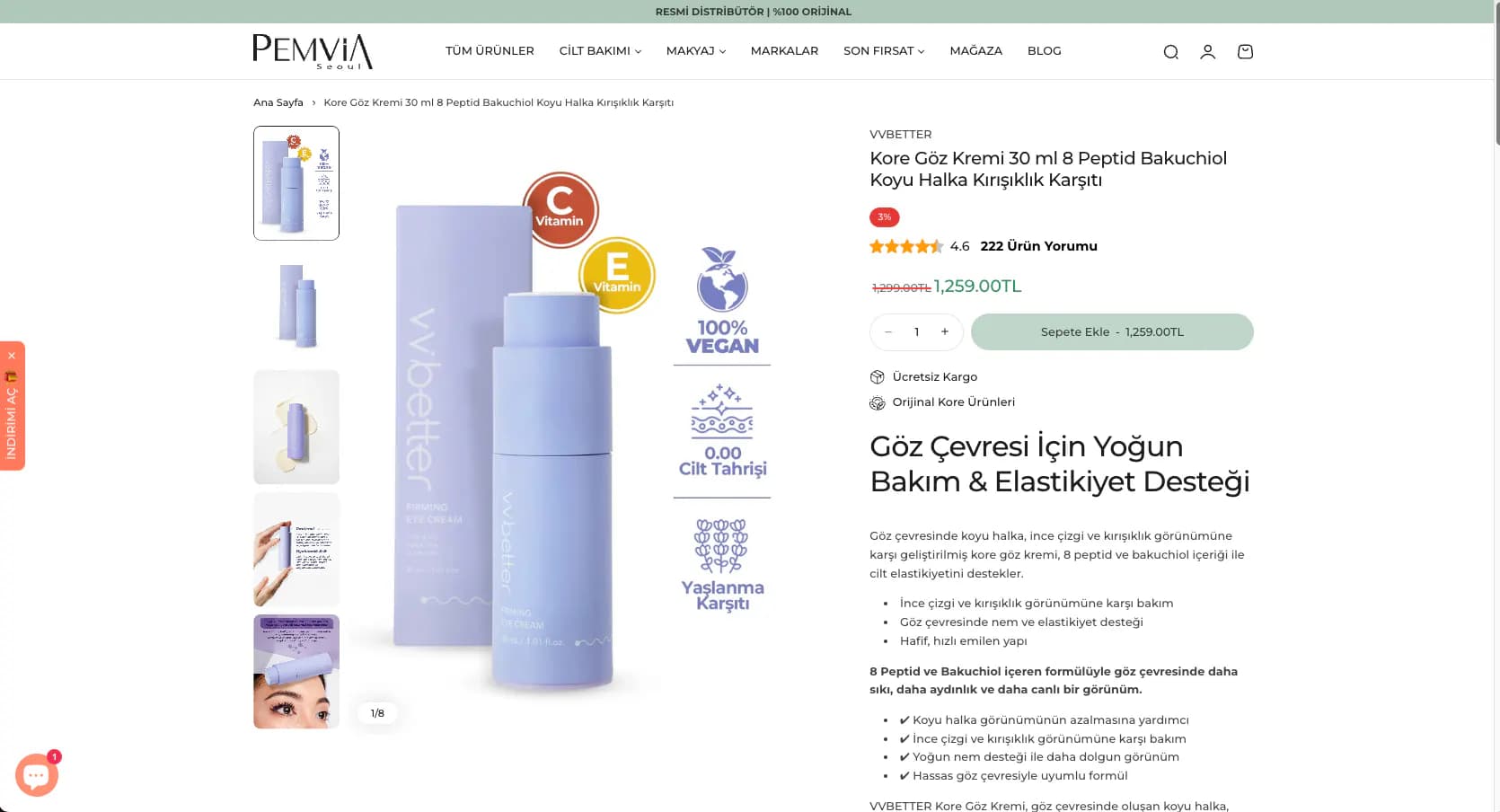
TRUST INSIDE YOUR STOREFRONT
Customers should not have to leave your product page to look for trust.
When valuable review history built on Trendyol is absent from the brand’s own store, visitors may need to validate a purchase elsewhere. The integration keeps selected customer experiences—with their source made clear—inside the shopping journey.
Visible source
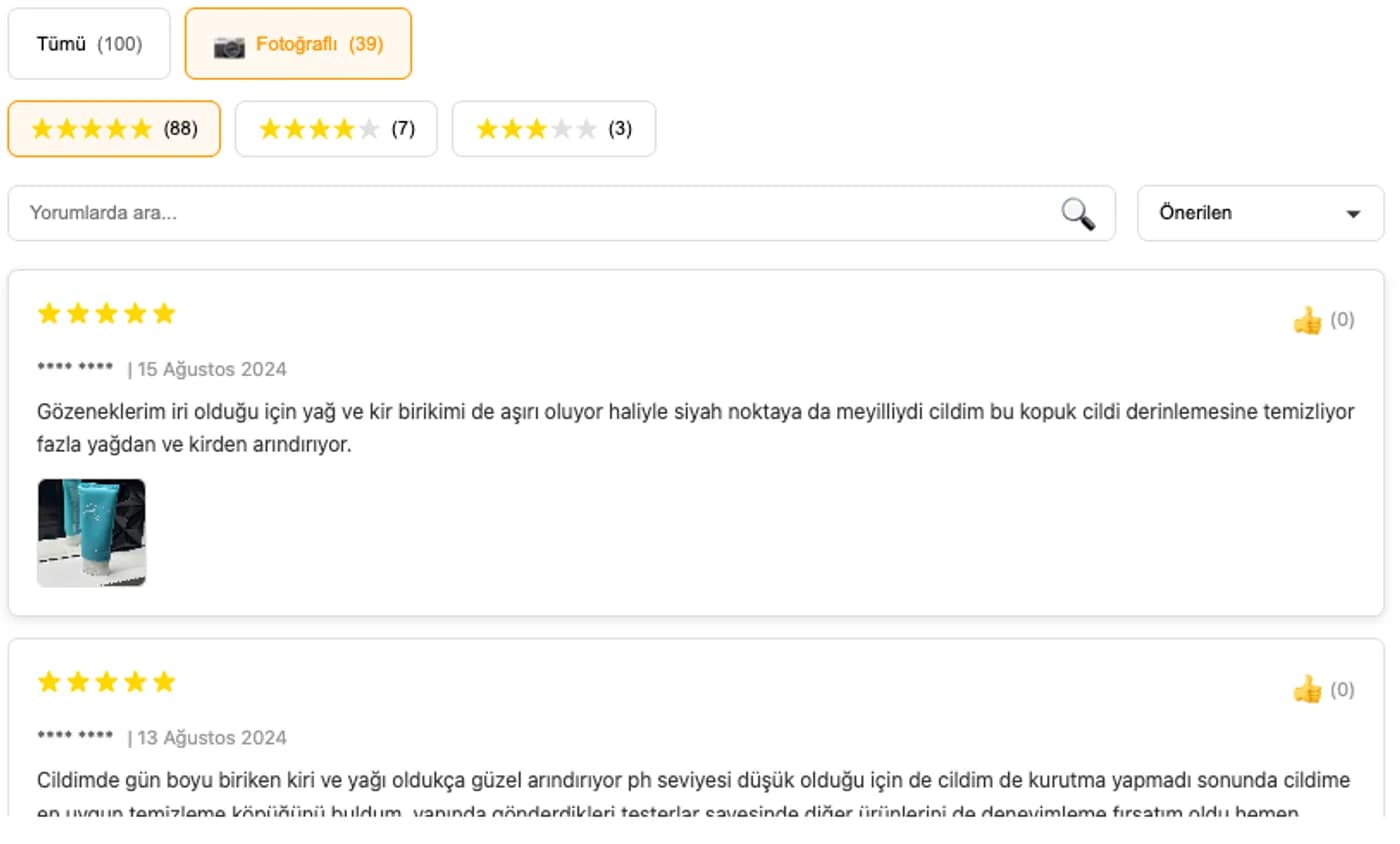
The storefront component clearly identifies the reviews as Trendyol-sourced.
Product context
Each review is matched to the relevant product or variant at the decision point.
Brand experience
Typography, colours and responsive behaviour are adapted to the storefront system.
CUSTOM SYNCHRONISATION SYSTEM
Collecting, matching and publishing review data through controlled rules.
Multimediatick’s custom synchronisation and matching infrastructure establishes product relationships, applies display rules and updates the storefront component at the agreed interval.
- 01
Trendyol review data
- 02
Custom synchronisation
- 03
Product / variant matching
- 04
Display rules
- 05
Storefront component
- 06
Scheduled updates
TRANSFERABLE FIELDS
Preserving the context customers need to make a decision.
Depending on project scope, ratings, review text, date, username, customer image and product variant can be transferred. Username display and image fields are configured around the store’s data policy and technical requirements.
SELECTION AND DISPLAY RULES
The displayed review set is defined through transparent rules.
Brands can set minimum rating and content criteria—for example, displaying only four- and five-star reviews. The page does not hide that this is a selected review feed. Sorting, image-review priority, text length and irrelevant-content controls are configured per project.
Minimum rating
A lower threshold such as four or five stars can be set for displayed reviews.
Content criteria
Rules can address spam, irrelevant content and fields outside the store policy.
Sorting
Recent, highly rated or image-based reviews can be prioritised.
Clear source label
The component makes both the Trendyol source and selected nature of the feed clear.
UPDATE FREQUENCY
Synchronisation follows the rhythm of the store.
Hourly updates can support high-volume review flows, while daily or project-specific schedules may suit other catalogues. The final interval is defined in the proposal after reviewing data volume and technical architecture.
Hourly
For product groups receiving reviews frequently and requiring faster updates.
Daily
For stores balancing data freshness with operational requirements.
Project-specific
A schedule based on catalogue size, infrastructure and traffic patterns.
PLATFORM COMPATIBILITY
Adaptable to hosted platforms and custom commerce software.
Compatibility logos do not indicate partnerships or certifications. Before setup, we validate the product model, theme structure, available access and matching requirements.

ikas
A custom review component adapted to the storefront with scheduled synchronisation.

Shopify
Product-level matching adapted to the theme or custom storefront.
Ticimax
Component setup aligned with the existing product and template structure.
T-Soft
Project-specific setup for product matching and storefront display.

IdeaSoft
An integration adapted after reviewing the theme and product structure.
WooCommerce
A component developed around the WordPress store theme and product model.
Custom software
Direct integration around the existing product model and frontend architecture.
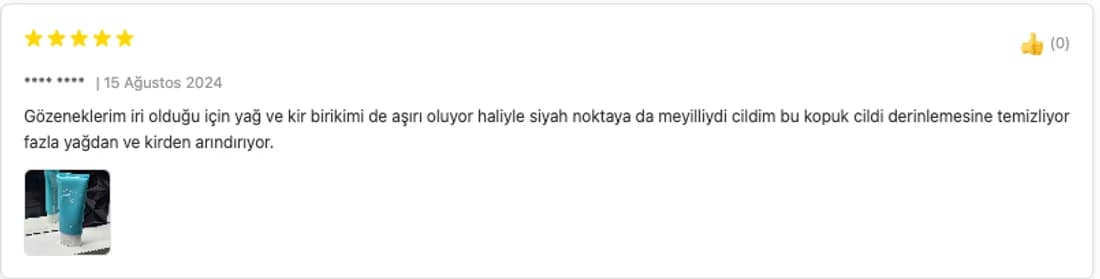
REAL IMPLEMENTATION · PEMVIA SEOUL
Bringing Trendyol social proof into Pemvia’s own ikas store.
For Pemvia Seoul, we implemented a working integration that matches products and displays selected Trendyol reviews inside the storefront. The screen shows rating, date, anonymised username, review text and image fields in the live store component.
SETUP, MAINTENANCE AND SECURITY
A one-time implementation with maintenance and support defined in the proposal.
Product matching, storefront component, display rules, initial data checks and synchronisation configuration are included in implementation. Maintenance, synchronisation infrastructure and support duration are specified according to platform, data volume and update frequency.
Technical assessment
We review the platform, theme, product model and available matching fields.
Implementation and QA
The component is delivered responsively and mappings are verified with sample products.
Data minimisation
Only fields required for the agreed storefront experience are processed.
Support boundary
Support duration, update frequency and change scope are defined in the proposal.
SEO AND STRUCTURED DATA
A visible review experience should first be accurate for users.
The integration strengthens visible social proof on product pages; it does not guarantee rankings or rich results. Review markup is considered per project only when visible data, source, storefront structure and search-engine rules make it appropriate.
FREQUENTLY ASKED QUESTIONS
Before bringing Trendyol reviews into your store.
How are reviews matched to products?+
Multimediatick’s custom matching system connects Trendyol product relationships with the product and variant model in your store. The exact method is defined after reviewing the storefront architecture.
How often can reviews be updated?+
Hourly, daily or project-specific schedules are available. The final interval is specified in the proposal after assessing data volume and platform suitability.
Can we display only highly rated reviews?+
Yes. Minimum ratings, image-review priority and content rules can be configured. The interface clearly identifies the feed as a selected set of Trendyol-sourced reviews.
Which review fields can be transferred?+
Ratings, text, dates, usernames, images and variant information can be transferred depending on scope. Display and data fields are configured around the store’s needs.
Which ecommerce platforms are supported?+
We can implement the integration for ikas, Shopify, Ticimax, T-Soft, IdeaSoft, WooCommerce and custom commerce software, subject to a technical compatibility review.
Does the implementation fee include maintenance?+
Implementation is scoped as a one-time project. Maintenance, synchronisation infrastructure and support duration are not presented as unlimited; they are specified in the proposal.
Does this guarantee SEO or sales growth?+
No. Reviews can support social proof on the product page, but rankings, rich results, conversion or sales outcomes are not guaranteed.
TECHNICAL COMPATIBILITY CHECK
Put your Trendyol review history to work inside your own store.
Share your platform, product-matching needs and preferred update rhythm. We will map the viable integration scope with you.